

Windows Publisher End of Life, October 2026
While Canva is now the more popular digital graphic design tool in libraries, some of you are using Microsoft Publisher for your poster-making needs.
Microsoft has announced that they will no longer be supporting Microsoft Publisher after October 2026. This means next year:
- Publisher will no longer be available for download from the MS 365 app store.
- Desktop versions already installed (or installed from standalone licensing, or non365 versions) will no longer be supported with updates.
What you should do if you are using Publisher:
- Save Publisher files as PDFs, then import into a program that allows you to edit or convert a PDF:
- Open PDF in Word.
- Open PDF file in Canva.
- Convert or edit a PDF with a free online tool like www.ilovepdf.com
- Recreate commonly used files in Canva, Word, PowerPoint
- Free advanced graphics creator option: GIMP. Note: this is intended more for graphics creation and editing than publishing layout and design.
- Expensive pro option: purchase an Adobe Illustrator license.
- If you have a standalone licensed version of Publisher, you may be able to continue using it (indefinitely?), but be aware that it will no longer be updated and may cease to function at some point.
End of support for Office 2016 and Office 2019
As I have been replacing computers I have also been steadily replacing the stand-alone MS Office 2016 and 2019 applications that libraries purchased through Tech Soup or were part of earlier deployments.
However, as of October 14, 2025, these versions of Office will officially no longer be supported or receive updates. Likely they will continue to function, but the best practice will be to make sure they are replaced with either MS 365 or 2021 stand alone licenses. Send an email to h if you believe you have a computer that needs updating.
To see which license a computer has for MS office, open an office application, go to “File > Account” and review the Product information.
Most full-time staff will have MS 365 desktop applications licensed:
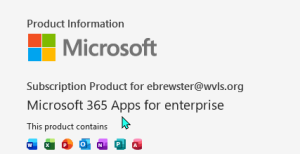
Public PCs should have MS Office LTSC 2021 license:
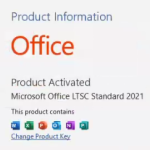
As we are transitioning to the new MS licensing model (see below), shared staff computers (circ computers, shared staff workroom computers, computers used by part-time staff), we will be moving these computers to the MS Office 2021 license, OR staff will be able to use browser-based applications with their email login.
Changes to Microsoft licensing for LEANWI/WVLS library staff
Some of you may have been aware that we received notice of a sudden change to our back-end Microsoft licensing structure (the licenses that allow you to have email, access to Microsoft Office products, etc.). LEANWI has known for some time that entities like libraries were going to be moved out of the “Education” pool and into a “Non-Profit” pool, but the “when” was always hazy. Then we suddenly got notification in late August that a major step in this direction would happen on September 2.
We (Josh) quickly shifted your licensing on the back end making some best guesses and judgement calls with what information we knew about the change in licensing model and how libraries were using their existing models.
tl;dr:
- If you find you are getting errors such as the one below (“Your school license will be deactivated soon”), please send an email to with the following info:
- Which PCs you are using when receiving these notifications.
- Whether that PCs are dedicated to individual personnel or shared between multiple users.
- If dedicated to an individual, which Office 365 user account (email) that PC’s office desktop license is tied to.
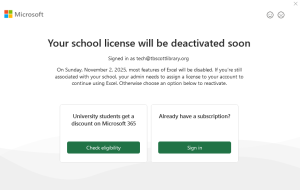
Future of licensing and costs: details are still fuzzy, but in the future we will (barring a major acts of corporate generosity) need to begin adjusting fees to incorporate some level of charge for MS user licenses that use tools beyond the in-browser apps (email, Office products with online access only) which as of now will remain free. Knowing Josh, he is going to do his darndest to keep these costs low and reasonable, but the major role you can play is to think about how you use your current emails/user accounts.
If you have a shared-use computer, we should be looking at installing a stand-alone license (like those we currently use on public PCs, see above) and not signing in with an email address the way we have been since I’ve been here. We should consider options for part-time staff who only need access to e-mail and can do that in the browser. We still want to encourage individual employee accounts as much as possible [insert cybersecurity and future multi-factor authentication discussion here], and this is still possible for free using browser-based tools. But we will want to think about who needs and uses the desktop applications of Word, Excel, PowerPoint, etc., and where and how they are used. I can work with you to review your library’s specific needs – and also take into consideration the future of multi-factor authentication, which is coming.